Diktum
Speak it. Draft it. Finish it in Word.
Dictate a letter and get a first draft in your firm’s style. Facts Diktum doesn’t have are marked as placeholders, never guessed. Then finish it in Microsoft Word.
Our ref: [matter reference]/JMC
29 September 2026
[client’s postal address]
Dear Alex
Re: [matter title]
Thank you for meeting with us on 29 September 2026.
Please send us the signed agreement and copies of the two outstanding invoices by 9 October 2026. We will review these documents and then arrange a follow-up call.
Yours sincerely
Jane McCarthy
Solicitor
From voice to a signed-off letter, in one workflow.
Five steps, one document. Scroll to watch the page change as it moves from your voice to Word.
-
01
Speak
Dictate in the browser, upload a phone recording, or type notes. Recognition knows UK legal terms and your matter’s names: Mesher order, CETV, client surnames.
-
02
Draft
Choose one of 16 built-in UK document types, or your firm’s own. The first draft arrives in your style, with missing facts left as [placeholders].
-
03
Refine
Ask for a change by voice or with one click. See exactly what changed, and undo it if you preferred the original.
-
04
Letterhead
Export on your firm’s letterhead, with its logo, running header and SRA footer.
-
05
Word
Open the .docx in Microsoft Word and finish it there, with Diktum for Word alongside.
Step01of 05 ·Speak
Dictate the letter. Read a first draft in your firm’s style.
One minute, start to finish: a recording becomes a letter, a spoken change shows exactly what it altered, and the result opens in Word on your letterhead.
In this demo: a recording becomes a client letter. Missing facts stay as red placeholders. A spoken instruction changes the wording, then the letter exports to Word on the firm’s letterhead. For a larger view, use Full screen in the player and turn your phone sideways.
What it does
- 3.1
Speak, upload or type.
Live dictation in the browser, a recording from your phone, or typed notes. Recognition is tuned to UK legal vocabulary and to the names in the matter.
- 3.2
16 UK document types, and your own.
Built in, ready to draft:
Attendance notesClient care lettersLetters before claimCPR 32 witness statementsWill and LPA instructionsand more
- 3.3
Gaps marked, not guessed.
If a fact wasn’t in the dictation, Diktum leaves a [placeholder], and a “Before you send” checklist lists every one.
- 3.4
Change it by voice or with one click.
“More formal”, “Shorter”, “Plain English for the client”. See exactly what changed, with undo.
- 3.5
Out on your letterhead.
Export to Word with your logo, running header and SRA footer.
Ask the matter’s files. Every answer shows its page.
In this silent demo: ask about the lease’s break clause, open the cited page to check the answer, then draft an email to the client and save it to the matter. Use Full screen in the player and turn your phone sideways for a larger view.
“The Tenant may end this lease on 25 March 2029 by giving the Landlord at least six months written notice, provided that all rent due has been paid and vacant possession is given.”
- Attendance note
- Telephone note
- File review
- Will instructions
- Legal research
- Company check
Also in the matter
- 4.1
Research with sources.
UK legal research that cites official sources only. Companies House briefings with red flags.
- 4.2
Matters, dates and conflicts.
Each matter keeps its key dates, and a conflict check runs when a matter is opened.
- 4.3
Connect your practice management system.
We can integrate with Clio (UK/EU) and Actionstep. Use another system? Contact us to discuss feasibility.
- 4.4
Time in six-minute units.
Record time as you work and export it as CSV.
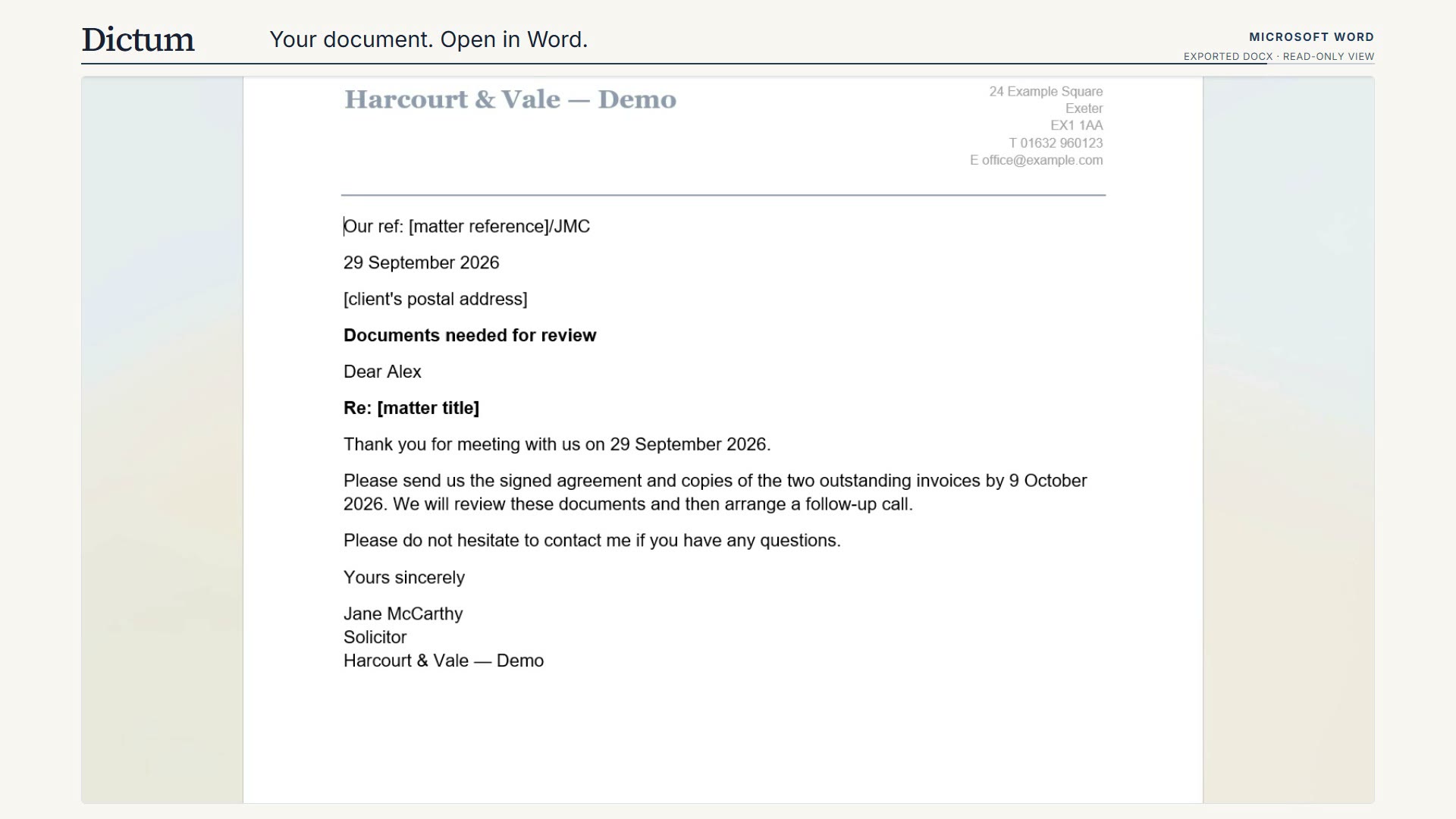
The result: an editable Word letter with the firm’s logo, header and footer. The missing matter reference, postal address and matter title remain marked for the solicitor to complete.
Diktum for Word. An agent inside the document.
It fills your tagged templates and proposes rewrites you apply or reject, batch by batch. Every edit is a real Word operation you can review in Word.
Our ref %[matter.ref] · Prepared for %[client.name]
Lease
of %[property.address]
1. Parties
(1) %[landlord.name] (the “Landlord”)
(2) %[tenant.name] (the “Tenant”)
2. Rent
The rent is %[rent.annual] a year, payable Choose an item.
3. Break clause
The Tenant may end this lease on %[break.date] by giving the Landlord at least six months’ written notice.
Rent deposit required
Illustration. Try Apply and Reject.
pages in the EU AI Act, the longest document we have tested it on. Diktum for Word handles documents of 100 pages and more.
- 5.1
Tagged templates.
Content controls (text, checkbox, dropdown) and %[client.name]-style placeholders, filled in place.
- 5.2
Long documents.
Works from the outline, reads sections on demand, and makes document-wide bulk edits.
- 5.3
References it can consult.
Upload .docx, .pdf, .txt or .md files for the agent to work from.
- 5.4
Edits you can review.
Rewrites, tightening and tone changes arrive as proposals. What you apply becomes a real Word edit and stays reviewable in Word.
The small print, in large print.
- (a)
Placeholders, not guesses.
A fact Diktum doesn’t have stays as a [placeholder], and the “Before you send” checklist lists each one.
- (b)
Cited sources.
Document chat links every answer to its page and checks the quoted words against the source. Legal research cites official sources only.
- (c)
Read-only to your PMS.
Our Clio and Actionstep integrations can import matters and use their files for drafting. They do not write back.
- (d)
Every edit reviewable.
In Diktum you see exactly what changed, with undo. In Word, you apply or reject each batch, and applied edits stay reviewable in Word.
Dictate your next letter with Diktum.
Leave your email and we will arrange a demo, or a place on the pilot.
If the form does not load, open the signup form.
Yours faithfully,
Diktum
- Encl.
- ;
- cc
- Fee earners, firm admins and COLPs in England & Wales